
Car Stock and Inventory Management Software for UK Garages and Traders
Vehicle Inventory, Prep Costs, Margin Per Unit and Days in Stock
Know exactly what every car on the forecourt cost you, what has gone into it, what it owes you and how long it has been sitting — in the same system that runs your workshop.
What Is Car Stock and Inventory Management Software?
Car stock management software — also called car inventory management software — is the record of every vehicle you have bought to sell: what you paid for it, what you have spent getting it ready, what you are asking for it, what you will accept, and how long it has been on your forecourt. For used car traders it works as a used car inventory management system that keeps the whole forecourt straight in one place.
That sounds simple enough to keep on a spreadsheet, and for the first three or four cars it is. The trouble starts when prep costs arrive in dribs and drabs weeks after the purchase — a set of tyres, an MOT and a service, a windscreen, a valet — and none of it gets written down against the right car. By the time a buyer is haggling on the drive, nobody can say with confidence what that vehicle actually owes.
Most garages selling a few cars a month are running the forecourt on memory. It works, mostly, and it quietly costs money in three specific ways: units sold too cheaply because the prep spend was underestimated, cash tied up in cars nobody realised had been sitting for four months, and buyers waiting on paperwork because the sale lives in a different place to the workshop.
My Garage CRM's car stock module deals with all three, and it sits alongside the diary, the jobs, the parts and the customer records rather than in a separate app you have to remember to open.
Car stock is not the same as parts stock
Parts inventory tracks consumables and components you buy in bulk and use across many jobs, with reorder points, suppliers and purchase orders. Car stock tracks individual vehicles, each one unique, each with its own cost, prep spend, asking price and age. My Garage CRM handles both on separate screens — see parts and stock management for the workshop side.
How Car Stock Management Works
Six steps from buying a car to seeing where the month landed. In practice the first four take about two minutes stood next to the vehicle with a phone.
Look up the registration
Type the reg and press Look up. The DVLA record fills in make, model, year, fuel type, engine size, colour and MOT expiry, so you are not copying spec off a V5C or guessing at an engine size.
Add what the lookup can't know
Mileage, variant or trim, body style, doors, seats, transmission, previous owners, service history and VIN. Photos go on at the same time, and the advert description and features list are written once rather than retyped for every enquiry.
Record what it cost
Cost price, prep or recon cost, advertised sale price, and the minimum price you will accept. Four numbers, and between them they tell you whether the deal in front of you is worth doing.
Get it in front of buyers
Set the vehicle to available and generate a public share link. Send it by WhatsApp, Facebook or text and the buyer sees the photos, spec, description and your contact number.
Reserve, sell, invoice
Mark it reserved while a deposit is down, then sold. The sale invoice carries the buyer's full details, the vehicle, the total, VAT where it applies, deposit and balance, warranty and terms. Download as PDF or email it straight over.
See where the month landed
The sales dashboard totals cars sold, revenue, cost and profit, with a month filter — so you can see how a month actually went rather than how it felt.
Know the Margin on Every Unit
Because cost price and prep cost live on the vehicle record, the margin is worked out per unit and stays current as costs go on. You are never reconstructing it from memory at the point of sale.
The stock list sorts by highest margin, so you can see which cars are worth pushing and which are barely paying for the space they occupy. That is a different question from which car is the most expensive, and it is the one that matters.
Four numbers across the whole forecourt
Most small traders could not tell you these off the top of their head. The stock screen shows all four at once:
The minimum price field
One field on the pricing screen does more work than the rest: the minimum price, the lowest figure you will take. It sounds trivial. It is the difference between negotiating and guessing.
Deciding your walk-away number in the quiet of the office, with the cost and the prep spend in front of you, is a completely different exercise from deciding it on the forecourt with a buyer watching your face. Most generic inventory tools have no field for it, because most were not built by anyone who has sold a car.
Days in Stock: The Number That Costs You Money Quietly
Every unit records days in stock from the moment it goes on, and the list sorts oldest first. It is a plain number and it is the most useful one on the screen.
A car sitting for ninety days is not simply a car that has not sold yet. It is money you cannot use to buy the next one. It is a unit that will probably need something else doing before it goes — another MOT, a battery, a fresh valet. And it is usually a car that was priced slightly wrong on day one and never revisited.
Traders who watch this number reprice early and turn stock faster. Traders who do not tend to find out how long something has been there at the point they finally shift it at a loss. Sorting by age takes two seconds and tells you what needs dealing with this week.
Available, reserved, sold
Vehicle status is set on the record and filters the list. A car held on a deposit shows as reserved rather than sold, so it is visibly different from one that has gone and been paid for — and if the deal falls through, the status goes back without the vehicle being stuck in the wrong state.
Send a Car Straight to a Buyer
Not every vehicle needs a portal listing. Plenty sell to someone who already services their car with you, to a friend of a customer, or to whoever replies first in a local Facebook group.
Generate a public share link for any vehicle and it produces a proper page with photos, spec, advert description and a contact number. Share it to WhatsApp or Facebook with one tap, or copy the link and send it however you like.
You can set a separate advert contact number from your main line, so sales enquiries do not tie up the phone the workshop needs. When those enquiries come in, the car sales CRM tracks each lead from first contact to handover. And when the car is gone, stop sharing — the link dies, so you are not still fielding calls three weeks later about something you sold.
A Proper Vehicle Sale Invoice
Selling a car is not the same transaction as selling a service, and a workshop invoice does not cover it. The vehicle sale invoice records what a used vehicle sale actually needs:
- The buyer in fullName, email, phone and full address including postcode, because a vehicle sale needs the buyer identified properly.
- The vehicleRegistration, make, model, year, colour, fuel type, mileage at point of sale, and VIN.
- Deposit and balanceWhat was put down to hold it and what is still owed, rather than a single total that hides the arrangement.
- VAT where it appliesVAT can be enabled per invoice, with the rate and amount shown separately.
- Warranty and termsThe warranty offered and your terms and conditions printed on the document, not agreed verbally on the forecourt and disputed later.
- Who sold it, and from whereSalesperson and site — which matters as soon as you have more than one person selling or more than one location.
- Payment method and statusSo a vehicle sitting on a deposit is visibly different from one paid in full.
Download it as a PDF for your records or email it straight to the buyer from the system. The invoice number and date sit on the record, so the paperwork exists in one place rather than in a folder on somebody's desktop.
Where a Garage Beats a Standalone Stock Tool
If you only sell cars, a dedicated dealer system makes sense. If you run a workshop that also sells cars — which describes most independents with a few units out front — the two halves feed each other constantly, and keeping them in separate systems is exactly where the admin goes.
A customer brings their car in for an MOT. It fails on something expensive. They ask what you have got for sale.
In a joined-up system that is one conversation. The customer is already in your CRM with their full service history. The car they are trading in has a record you can see, because you have been maintaining it. The car they are buying is in your stock list with its asking price and your minimum. And the prep work on the trade-in goes through the workshop as a normal job, so the labour and parts land against that unit.
That last point is the one most people miss. Prep done in your own workshop is still a real cost. If it is not recorded against the vehicle, the margin on that unit is fiction.
The case for keeping car stock in your garage system is not a longer feature list. It is fewer places for the same car to exist.
Car Stock Software vs a Spreadsheet
A spreadsheet is free and you already know how to use it. That is a genuine advantage, and it is worth being straight about where the line actually falls.
| What you need | Spreadsheet | My Garage CRM |
|---|---|---|
| Entering vehicle spec | Typed by hand off the V5C | Filled from the DVLA record by registration |
| Prep costs added weeks later | Only if someone remembers to open the file | Recorded against the unit, margin updates |
| Days in stock | Manual date maths | Tracked automatically, sortable oldest first |
| Photos and advert copy | Somewhere on a phone | Attached to the vehicle record |
| Sending a car to a buyer | Photos and details pasted into a message | One share link with photos, spec and contact number |
| Sale invoice | Separate template, retyped | Raised from the vehicle, emailed or PDF |
| Link to the workshop | None | Same customers, same jobs, same system |
| Cost | Free | Included in the Enterprise plan |
If you sell one or two cars a year, a spreadsheet is genuinely fine and we would rather tell you that. The maths changes when you are holding several units at once and the prep spend stops being something you can keep in your head.
Who Car Stock Management Is Built For
Independent garages with a forecourt
Servicing and repair is the core business, but there are always a few cars out front. You need stock tracked properly without running a second system for six vehicles.
Small used car traders
Ten to thirty units turning over. Margin per unit and days in stock are the two numbers that decide whether the month works, and both need to be visible without rebuilding a spreadsheet.
MOT stations taking part exchanges
Failures turn into trade-ins. The customer, the failing vehicle and the replacement are all already in your system, so the whole conversation happens in one place.
Garages prepping their own stock
If your own technicians do the prep, that labour and those parts are a real cost. Recording them against the unit is the only way the margin figure means anything.
Multi-site operations
Sale invoices record the site and the salesperson, so you can see what sold, who sold it and where, once you are running more than one location.
Anyone still on a spreadsheet
If the honest answer to "what did that car cost you, all in?" is a pause and a guess, that is the problem this module exists to solve.
VAT, Records and Keeping It Straight
VAT on a used vehicle is more complicated than VAT on a service, and it depends on how you bought the car. Many second-hand vehicle sales are handled under the VAT margin scheme, where VAT is accounted for on the margin rather than the full selling price — but whether that applies to a given vehicle depends on how you acquired it and how you are registered.
That is a decision for you and your accountant, and the current rules are on GOV.UK. My Garage CRM records the VAT you tell it to record on the sale invoice, with the rate and amount shown separately. It does not decide your VAT treatment for you, and no software should claim to.
What it does give you is the record: what you paid, what you spent, what you sold it for, when, and to whom, with the invoice attached. Whichever scheme you are on, that is the evidence your accountant will ask for — and having it per vehicle rather than scattered across a bank statement and a notebook is what makes the year-end conversation a short one.
Which Plan Includes Car Stock Management
The Car Sales module is part of the Enterprise plan, alongside recovery and breakdown tracking, SMS marketing campaigns, the financial dashboard, API access and priority support.
Every account starts with 28 days of full access to everything, with no card required — so you can put real vehicles through the stock flow, raise a real sale invoice and see whether it fits how you work before deciding anything. Migration from whatever you use now is free, and if there is a field you need that we do not have, we will build it.
Real Results from Dealers and Traders
How independent traders, forecourts and dealer groups use car stock management day to day.

Used Car Trader: £14k Recovered from Units Sold Too Cheap
An independent trader stopped pricing cars before prep spend was counted, and recovered around £14k a year in margin that had been quietly given away.
£14k margin recovered · true cost on every car Read the case study →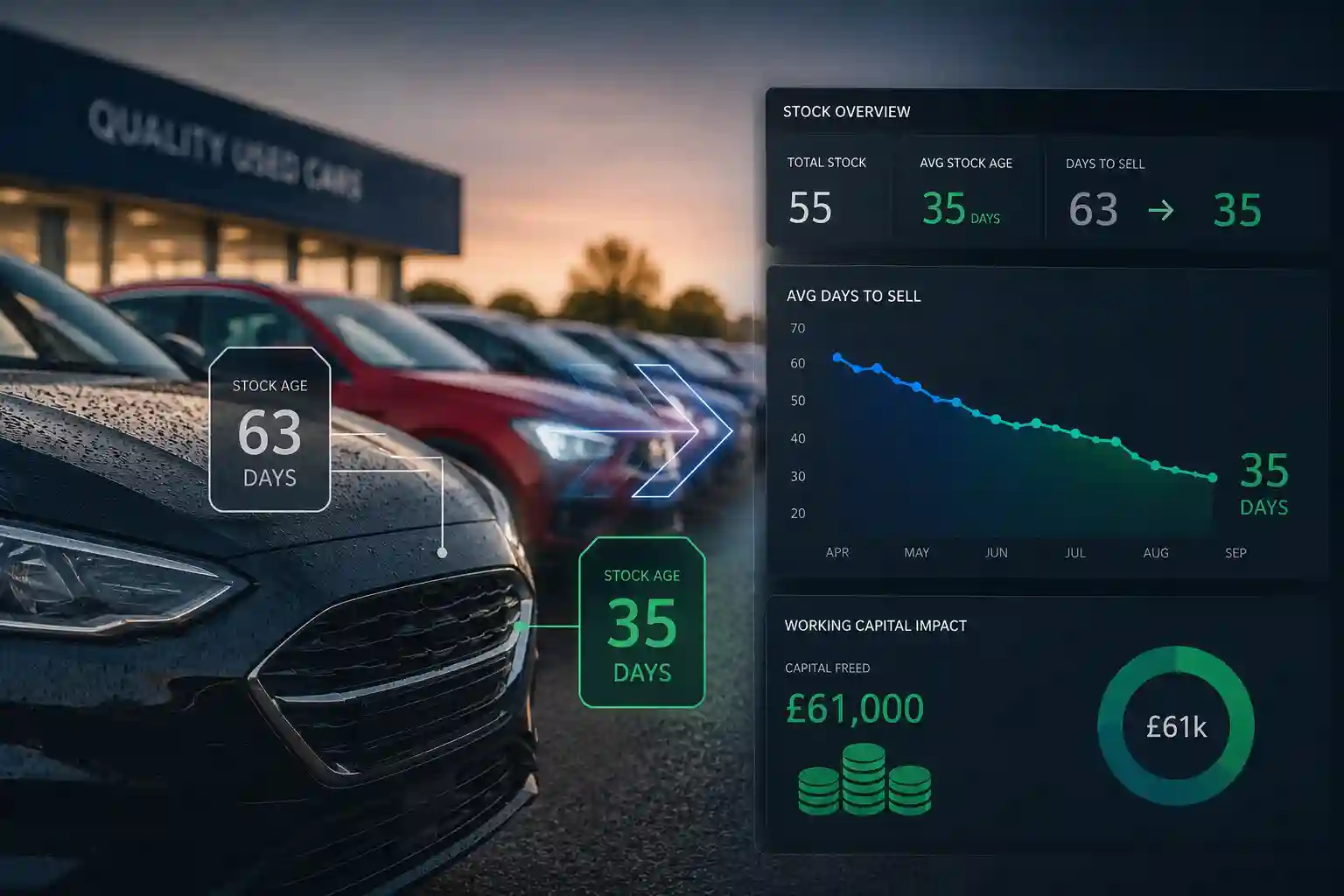
Forecourt Part-Exchange: £61k Freed from Faster Stock Turnover
A part-exchange-heavy forecourt tracked days-in-stock on every vehicle, cutting time-to-sell from 63 days to 35 and freeing £61k of working capital.
£61k capital freed · days-to-sell 63 → 35 Read the case study →
20-Car Forecourt: Prep Costs Finally Land on the Right Vehicle
A 20-car forecourt logged every recon cost against the right vehicle, so true margin was clear before pricing — no more shared-pot guesswork.
Prep cost tracked per unit · real margin per car Read the case study →
Multi-Site Trader: 150 Cars Across 3 Sites in One Live Stock List
A three-site dealer group put 150 cars into one live stock list with DVLA lookup — no duplicate adverts, no misplaced cars, one group view of age and margin.
150 cars · 3 sites · one live stock list Read the case study →Car Stock Management — Frequently Asked Questions
Car stock management software records every vehicle you have bought to sell — what it cost, what you have spent preparing it, what you are asking for it and how long it has been sitting. It replaces the spreadsheet or notebook most small traders and garages use, and gives you the margin on each unit at a glance.
Yes. Car stock management and used car inventory management are the same thing — a system that tracks every vehicle you hold to sell, with its cost, prep spend, margin and days in stock. My Garage CRM works as a car inventory management system for independent traders and garages, keeping the whole forecourt in one live list instead of a spreadsheet.
No. Enter the registration and press Look up. My Garage CRM pulls the make, model, year, fuel type, engine size, colour and MOT expiry from the DVLA record and fills the form. You add the details specific to that car — mileage, variant, service history, previous owners and the VIN.
Yes. Each vehicle records a cost price, a prep or recon cost and a sale price, so the margin is calculated per unit and updates as costs go on. The stock list sorts by highest margin, and the totals show stock value, total invested and potential profit across everything you are holding.
Every vehicle tracks days in stock from the date it was added, and the list sorts oldest first. Ageing stock ties up money you could be using to buy the next unit, so seeing it ranked by age is the quickest way to decide what needs repricing this week.
Yes. Generate a public share link for any vehicle and send it straight to a buyer by WhatsApp, Facebook or text. The link shows the photos, spec and advert description with your contact number, and you can use a separate advert number if you want sales calls kept off your main line. Stop sharing and the link stops working.
Yes, and this is where a garage system has the advantage over a standalone stock tool. The customer is already in your CRM with their vehicle history, so a car taken in part exchange can go straight into stock, be prepped through the workshop as a normal job, and have that prep cost recorded against the unit.
Completely. Parts inventory tracks consumables and components bought in bulk and used across many jobs, with reorder points and suppliers. Car stock tracks individual vehicles, each unique, each with its own cost, prep spend, asking price and age. My Garage CRM handles both, on separate screens.
Yes. Vehicle status is set on the stock record and can be changed between available, reserved and sold, so a deal that falls through after a deposit does not leave the car stuck in the wrong state.
Yes. The sale invoice records the salesperson and the site, so you can see who sold what and from where once you are running more than one location or more than one person on sales.
The Car Sales module is part of the Enterprise plan. Every account starts with a 28-day free trial giving full access to everything, so you can test the car stock flow with real vehicles before deciding.
Stop Running the Forecourt on a Spreadsheet
Put your current stock in, add what each unit cost and what has gone into it, and see the margin and the age on every car on one screen. Twenty-eight days, full access, no card required.
Garage Tips & Guides
Why Independent Garages Need a CRM
How a dedicated CRM helps independent garages retain customers, boost repeat bookings and compete with franchised dealers.
Read more →Your First 30 Days with Garage CRM
A step-by-step guide to getting up and running — importing customers, setting up reminders and seeing results from week one.
Read more →Parts Not Invoiced: The Hidden Revenue Leak
Work that gets done and never billed is the quietest way a garage loses money. Where it happens and how to close it off.
Read more →Paper to Digital: A Garage Owner's Guide
Moving off job sheets, notebooks and spreadsheets without stopping work for a fortnight.
Read more →What to Look For in Garage Management Software
The questions worth asking before you sign anything, including the ones about contract length.
Read more →Tracking Technician Efficiency
What to measure, what to ignore, and how to use the numbers without turning the workshop against you.
Read more →